
What Is CRM in 2026, and What Will CRM Become by 2030 and 2036?
For many years, CRM was explained very simply.
It was a place where companies stored customer names, contact details, leads, opportunities, service cases, and follow-up activities.
That definition is no longer enough.
In 2026, CRM is not just a customer database. It is becoming the system that connects how a business attracts customers, understands them, sells to them, services them, retains them, and learns from every interaction.
The better question is no longer:
“Do we have a CRM?”
The better question is:
“Does our CRM reflect how our business actually works?”
Because a CRM for a utility company is not the same as a CRM for a SaaS company. A CRM for a real estate developer is not the same as a CRM for a consulting firm. A CRM for a bank is not the same as a retail CRM.
This is the real shift.
CRM is moving from a generic sales tool to a business-specific customer operating system.
What Is CRM?
CRM stands for Customer Relationship Management.
At the basic level, CRM is a system that helps businesses manage customer relationships, customer data, customer interactions, sales opportunities, service requests, marketing campaigns, and communication history.
A traditional CRM helps companies manage:
| Leads | New inquiries, prospects, campaigns, sources |
| Accounts | Companies, customers, partners, institutions |
| Contacts | Individuals connected to accounts |
| Opportunities | Sales deals, pipeline stages, forecasts |
| Activities | Calls, meetings, tasks, emails, follow-ups |
| Cases | Service issues, complaints, support requests |
| Campaigns | Marketing outreach, segmentation, engagement |
| Dashboards | Reports, KPIs, performance visibility |
But this is only the starting point.
A more modern definition is:
CRM is the customer operating layer that helps a company manage customer data, customer journeys, revenue processes, service processes, automation, communication, and decision-making across the full customer lifecycle.
In simple words:
CRM should not only store customer information.
It should help the business act better.
What CRM Used to Be
Earlier, CRM was mostly used for:
- Storing customer data
- Tracking sales activities
- Managing opportunities
- Building sales forecasts
- Creating management reports
- Tracking service cases
This was useful because it moved businesses away from spreadsheets, personal notebooks, inboxes, and memory-based follow-ups.
But many CRM implementations became too narrow.
They became systems where salespeople entered data only because management wanted reports.
That created a problem.
When users feel that CRM is only for management visibility, they avoid it, delay updates, or enter incomplete information.
That is why many CRM systems fail.
The issue is usually not the CRM software.
The issue is that CRM was not designed around the company’s real operating model.
What Is CRM in 2026?
In 2026, CRM is becoming broader, more intelligent, and more connected.
A modern CRM connects:
- Sales
- Marketing
- Customer service
- Customer success
- Finance touchpoints
- Operations
- Partner channels
- Customer portals
- Mobile apps
- Communication platforms
- Data platforms
- AI assistants and AI agents
Salesforce now publicly positions its CRM around AI-powered customer relationship management, and its Agentforce platform is designed to build autonomous AI agents that support employees and customers across the Salesforce ecosystem. (Salesforce)
This shows where CRM is heading.
It is no longer only about records.
It is about actions, decisions, automation, intelligence, and customer experience.
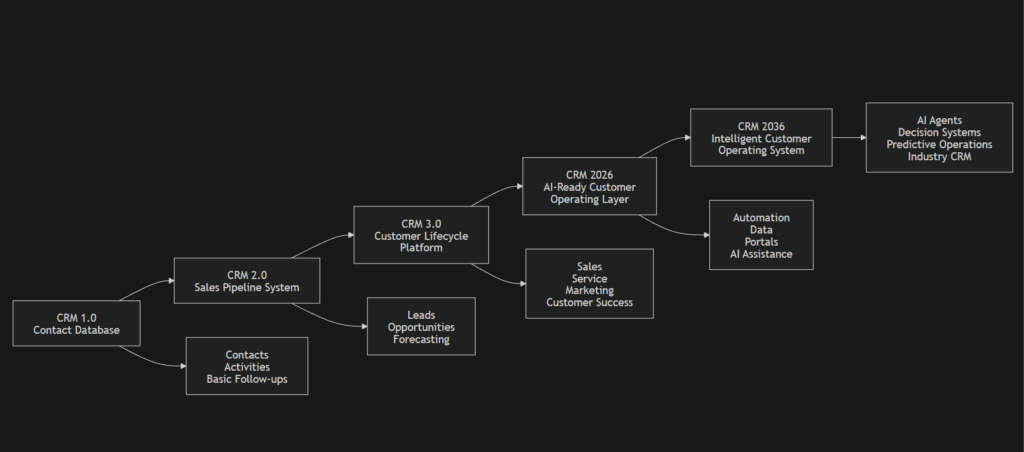
CRM Evolution Diagram
CRM Is Not One-Size-Fits-All
One of the biggest mistakes companies make is assuming every business needs the same type of CRM.
That is not true.
A simple SaaS company may need a lightweight CRM for leads, demos, trials, renewals, and churn signals.
A real estate developer may need CRM to manage inventory, brokers, bookings, payment plans, contracts, collections, handover, snagging, and post-sale service.
A utility company may need CRM to manage premises, meters, billing, payments, complaints, outages, field service, and regulatory communication.
A consulting firm may need CRM to manage stakeholders, proposals, pricing approvals, delivery handovers, and account growth.
The CRM must reflect the company’s information system design.
It must understand:
- What the company sells
- How complex the product or service is
- How customized the customer journey is
- How many teams touch the customer
- What data is needed at each stage
- What systems must integrate
- What decisions the CRM must support
This is why CRM strategy should begin with the business model, not with software configuration.
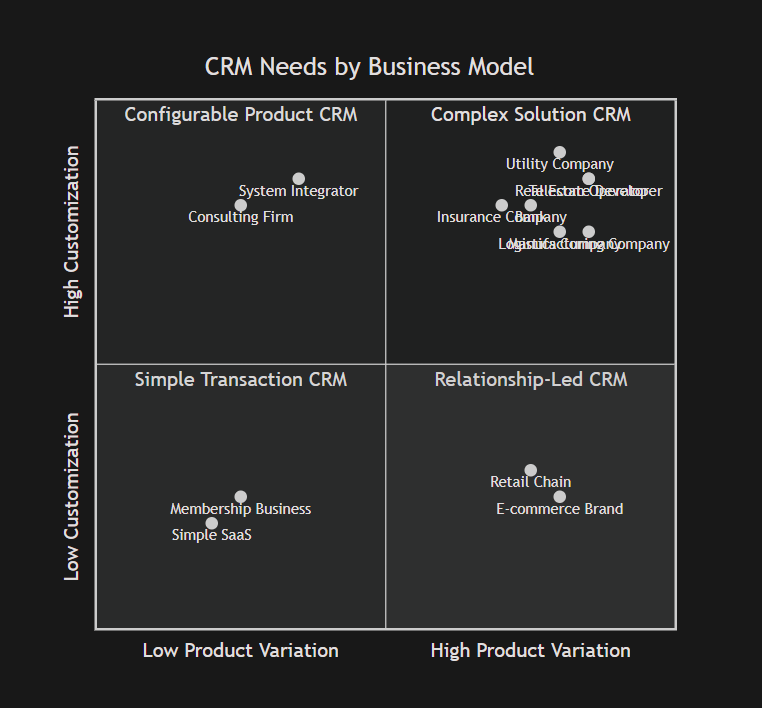
The 4-Quadrant CRM Model
A practical way to understand CRM needs is to map companies across two dimensions:
- Product Variation
How many products, services, SKUs, plans, units, assets, or packages does the company manage? - Customization Level
How much does pricing, contracting, delivery, implementation, service, approval, or customer handling change from customer to customer?
This creates four CRM categories.
Quadrant 1: Low Product Variation, Low Customization
Simple Transaction CRM
This quadrant includes businesses that sell a relatively simple product or service with limited customization.
Examples
- Simple SaaS products
- Training programs
- Membership businesses
- Small clinics
- Local service providers
- Basic subscription businesses
- Standard appointment-based services
CRM Focus
For these companies, CRM should be simple, fast, and adoption-friendly.
The goal is not to create a complex enterprise system.
The goal is to avoid missed leads, delayed follow-ups, poor visibility, and weak renewal discipline.
Typical CRM Needs
| CRM Need | Details |
|---|---|
| Lead capture | Website forms, ads, social media, WhatsApp inquiries |
| Contact management | Basic customer and prospect records |
| Simple pipeline | New, contacted, qualified, proposal, won, lost |
| Follow-up reminders | Calls, emails, WhatsApp, task alerts |
| Appointment booking | Useful for service-led companies |
| Basic campaigns | Simple email or SMS segmentation |
| Renewal reminders | For subscription or membership models |
| Basic dashboards | Leads, conversion, revenue, pending follow-ups |
What These Companies Should Avoid
They should avoid overbuilding.
Too many fields, workflows, approval layers, dashboards, and custom objects can make CRM feel heavy.
For this quadrant, CRM should create discipline without creating friction.
Quadrant 2: High Product Variation, Low Customization
Configurable Product CRM
This quadrant includes companies that sell many products, SKUs, units, plans, packages, or inventory items, but where each product is mostly standardized.
Examples
- Retail chains
- E-commerce businesses
- Automotive dealerships
- Consumer electronics distributors
- Furniture and home improvement brands
- Real estate brokerages with many listings
- Travel package companies
- Hospitality groups with room/package variations
CRM Focus
For these companies, the CRM must help match customers with the right product.
The challenge is not deep customization.
The challenge is product discovery, inventory visibility, customer preference management, and conversion analytics.
Typical CRM Needs
| CRM Need | Details |
|---|---|
| Product catalog | Products, SKUs, packages, rooms, units, plans |
| Search and filtering | Price, category, location, size, features |
| Customer preferences | Budget, interest, category, timing, region |
| Recommendation logic | Suggested products based on preferences |
| Inventory visibility | Availability, reserved items, stock status |
| Offer management | Discounts, campaigns, bundles |
| Omnichannel capture | Store, website, marketplace, social, WhatsApp |
| Campaign segmentation | Product interest, behavior, purchase history |
| Conversion analytics | Product demand, lead-to-sale conversion |
Example: E-commerce Brand
An e-commerce CRM should know:
- What the customer viewed
- What they added to cart
- What they abandoned
- What they purchased earlier
- What categories they prefer
- What offer should be sent next
The CRM is not just storing a contact.
It is building a customer preference engine.
Quadrant 3: Low Product Variation, High Customization
Relationship-Led CRM
This quadrant includes companies that sell a limited number of services or solutions, but each deal is highly customized.
Examples
- Consulting firms
- Legal firms
- Architecture firms
- System integrators
- Agencies
- Enterprise implementation partners
- Cybersecurity advisory firms
- Custom software development companies
- B2B professional services firms
CRM Focus
For these companies, CRM should manage trust, relationships, stakeholders, requirements, proposal versions, approvals, and delivery handovers.
The company may sell a small number of service categories, but every opportunity may have a different scope, decision process, price, timeline, and delivery model.
Typical CRM Needs
| CRM Need | Details |
|---|---|
| Account management | Deep account history and relationship tracking |
| Stakeholder mapping | Decision-makers, influencers, users, procurement, finance |
| Discovery notes | Business problems, requirements, priorities |
| Opportunity qualification | Need, budget, authority, timeline, fit |
| Proposal tracking | Scope, versions, assumptions, commercials |
| Pricing approvals | Discounts, margins, exceptions |
| Sales-to-delivery handover | Context transfer after deal closure |
| Account growth | Upsell, cross-sell, renewal, expansion |
Example: System Integrator
A system integrator may sell “CRM implementation services,” but no two deals are the same.
One customer may need Salesforce Sales Cloud.
Another may need Salesforce with ERP integration.
Another may need customer portal, mobile app, automation, data migration, and AI readiness.
The CRM must capture context, not just deal value.
Quadrant 4: High Product Variation, High Customization
Complex Solution CRM
This is the most complex CRM environment.
These companies manage many products, services, assets, accounts, contracts, workflows, approvals, documents, service requests, and operational dependencies.
Examples
- Real estate developers
- Utility companies
- Telecom operators
- Banks
- Insurance companies
- Manufacturing companies
- Logistics companies
- Healthcare networks
- District cooling companies
- Waste management companies
- Smart city infrastructure operators
- Large B2B distributors
- Public sector service organizations
CRM Focus
For these companies, CRM cannot be limited to lead and opportunity management.
CRM becomes a full customer operating system.
It must connect:
- Customer data
- Product data
- Asset data
- Billing data
- Contract data
- Service data
- Field operations
- Partner channels
- Compliance workflows
- AI recommendations
- Customer communication
Typical CRM Needs
| CRM Need | Details |
|---|---|
| Customer 360 | Unified view across sales, service, billing, contracts, assets |
| Product / asset master | Units, meters, policies, accounts, machines, services |
| Complex journey management | Inquiry to service, renewal, complaint, or expansion |
| Pricing and quotation | Discounts, approvals, bundles, payment plans |
| Document generation | Proposals, contracts, invoices, letters, forms |
| Approval workflows | Sales, finance, legal, compliance, operations |
| Customer portal | Payments, documents, requests, status tracking |
| Partner portal | Brokers, dealers, agents, vendors, channel partners |
| ERP / core integration | Finance, inventory, billing, fulfillment, service |
| Field service integration | Work orders, technicians, inspections, site visits |
| Compliance and audit | Approval history, communication history, SLA records |
| AI assistance | Risk alerts, summaries, next best action, case routing |
This quadrant is where CRM becomes most strategic.
The CRM is no longer just a department tool.
It becomes part of the company’s operating architecture.
Industry Examples: Different Companies Need Different CRM Designs
1. Utility Companies: CRM for Essential Services
Utility companies are one of the clearest examples of why CRM must be designed around the operating model.
A utility company may provide electricity, water, gas, district cooling, telecom, waste management, or municipal services.
At first glance, this may look simple.
But the customer relationship is actually complex.
A utility CRM may need to manage:
- Residential customers
- Commercial customers
- Industrial customers
- Government accounts
- Properties and premises
- Meters and devices
- Consumption data
- Tariff categories
- Monthly billing
- Payment reminders
- Disconnection and reconnection
- Complaints
- Outages
- Field technician visits
- Emergency alerts
- Regulatory reporting
- SLA tracking
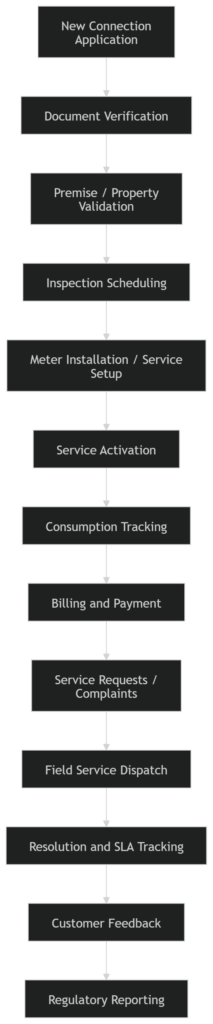
For a utility company, CRM must connect customer service, billing, field service, asset data, meter data, finance, operations, and communication channels.
Utility CRM Journey
Utility CRM Needs
| CRM Area | Utility-Specific Requirement |
|---|---|
| Customer master | Residential, commercial, industrial, government |
| Premise management | Link customer to property, unit, building, or location |
| Meter linkage | Connect accounts with meters, devices, assets |
| Billing integration | Invoices, consumption, payments, dues |
| Service requests | Complaints, faults, leakage, pressure issues, outages |
| Field service | Technician dispatch, inspections, work orders |
| Outage communication | SMS, WhatsApp, email, app alerts |
| Payment follow-up | Reminders, payment plans, disconnection warnings |
| SLA tracking | Response time, resolution time, escalations |
| Regulatory reporting | Complaint categories, outage reports, audit trail |
For utility companies, CRM is not simply “customer management.”
It is customer-service operations management.
2. Real Estate Developers: CRM Across the Full Buyer Lifecycle
A real estate developer sits strongly in the high product variation, high customization quadrant.
It may manage:
- Projects
- Towers
- Villas
- Plots
- Units
- Inventory availability
- Brokers
- Buyers
- Payment plans
- Contracts
- Collections
- Handover
- Snagging
- Community service
A real estate CRM should not stop at lead management.
It should connect the full journey:

Real Estate CRM Needs
| Area | Requirement |
|---|---|
| Inventory | Projects, buildings, floors, units, availability |
| Broker management | Broker portal, commissions, registrations |
| Customer journey | Inquiry to booking to handover |
| Payment plans | Installments, due dates, collections |
| Documents | SPA, booking forms, receipts, letters |
| Handover | Inspection, appointment, snagging, possession |
| Service | Warranty, complaints, community requests |
| Portal | Customer and broker self-service |
For real estate, CRM becomes a revenue, inventory, customer, and service operating layer.
3. Banks: CRM for Customer 360 and Relationship Growth
Banks manage many products and highly regulated customer journeys.
A bank CRM must support:
- Customer 360
- KYC
- Accounts
- Credit cards
- Loans
- Mortgages
- Wealth products
- Complaints
- Relationship managers
- Risk and eligibility
- Cross-sell recommendations
- Compliance communication
Bank CRM Needs
| CRM Area | Banking Requirement |
|---|---|
| Customer 360 | Accounts, loans, cards, complaints, interactions |
| KYC | Identity, documents, risk profile |
| Product holding | What products the customer already has |
| Lead management | Loan, card, mortgage, investment interest |
| Relationship manager view | Portfolio, tasks, opportunities, risks |
| Complaint handling | SLA, escalation, regulatory records |
| AI recommendations | Next best offer, churn risk, eligibility |
For banks, CRM is not just about sales.
It is about trust, compliance, relationship depth, and customer lifetime value.
4. Insurance Companies: CRM for Policy, Claims, and Renewal
Insurance companies manage a complex relationship between customers, brokers, policies, claims, renewals, and documents.
Insurance CRM Needs
| CRM Area | Insurance Requirement |
|---|---|
| Policy lifecycle | New policy, endorsement, renewal, cancellation |
| Broker management | Broker accounts, commissions, submissions |
| Claims communication | Claim updates, documents, service history |
| Renewal management | Renewal reminders, retention campaigns |
| Cross-sell | Motor, health, property, life, commercial |
| Corporate accounts | Group policies, employee coverage |
| Compliance | Document trail, approval history, communication records |
For insurance, CRM must connect customer communication with policy and claims context.
5. Manufacturing Companies: CRM for Dealers, Quotes, and After-Sales
Manufacturing CRM is often underestimated.
Many manufacturers need CRM for:
- Dealers
- Distributors
- B2B customers
- Product configuration
- Custom quotations
- Pricing approvals
- Production feasibility
- Delivery timelines
- Warranty
- Spare parts
- Service cases
Manufacturing CRM Needs
| CRM Area | Manufacturing Requirement |
|---|---|
| Dealer management | Channel sales, territories, performance |
| Product configuration | Custom specs, product options |
| Quotation | Price, margin, approval, validity |
| Order visibility | Production and delivery status |
| Warranty | Installed base, claims, service cases |
| Spare parts | Requests, availability, fulfillment |
| Account growth | Repeat orders, service contracts |
For manufacturers, CRM must connect front-end sales with product, production, delivery, and after-sales service.
6. Logistics Companies: CRM for Demand, Capacity, and Exceptions
A logistics CRM must manage relationships and operational commitments.
It may need to track:
- Shippers
- Carriers
- Routes
- Rates
- Contracts
- Spot pricing
- Capacity
- Shipment status
- Proof of delivery
- Claims and disputes
- Delays and exceptions
Logistics CRM Needs
| CRM Area | Logistics Requirement |
|---|---|
| Shipper management | Customer demand, lanes, contract terms |
| Carrier / broker management | Supply, rates, reliability |
| Quote management | Spot rates, contract pricing |
| Shipment visibility | Status, exceptions, proof of delivery |
| Complaint handling | Delays, damages, disputes |
| Profitability | Margin by customer, route, contract |
| AI assistance | Route risk, delay alerts, pricing suggestions |
For logistics, CRM must connect sales, operations, pricing, and service exceptions.
7. Telecom Operators: CRM for Plans, Devices, Billing, and Churn
Telecom CRM is high-volume and highly complex.
It must manage:
- Plans
- Add-ons
- Devices
- SIMs
- Contracts
- Billing
- Network complaints
- Upgrades
- Retention
- Churn prediction
- Service requests
Telecom CRM Needs
| CRM Area | Telecom Requirement |
|---|---|
| Customer profile | Individual, family, corporate accounts |
| Product holding | Plans, devices, add-ons, contracts |
| Billing integration | Usage, invoices, outstanding payments |
| Service complaints | Network, billing, device, plan issues |
| Retention | Churn risk, upgrade offers |
| Campaigns | Personalized bundles and offers |
| AI | Next best offer, complaint classification |
For telecom, CRM must operate at scale while still personalizing service.
CRM Needs by Industry: Summary Table
| Industry | Likely Quadrant | CRM Type | Key CRM Focus |
|---|---|---|---|
| Simple SaaS | Low variation, low customization | Simple Transaction CRM | Leads, demos, trials, renewals |
| Membership Business | Low variation, low customization | Simple Transaction CRM | Signups, reminders, renewals |
| Retail / E-commerce | High variation, low customization | Configurable Product CRM | Product matching, campaigns, behavior |
| Hospitality | High variation, medium customization | Experience CRM | Guest preferences, bookings, loyalty |
| Consulting | Low variation, high customization | Relationship-Led CRM | Stakeholders, proposals, account growth |
| System Integrators | Low variation, high customization | Relationship-Led CRM | Discovery, solution design, delivery handover |
| Real Estate Developers | High variation, high customization | Complex Solution CRM | Inventory, brokers, booking, handover |
| Utility Companies | High variation, high customization | Complex Operational CRM | Premises, meters, billing, outages, field service |
| Telecom Operators | High variation, high customization | Complex Solution CRM | Plans, devices, billing, churn, service |
| Banks | High variation, high customization | Complex Solution CRM | Customer 360, KYC, products, complaints |
| Insurance Companies | High variation, high customization | Complex Solution CRM | Policies, claims, brokers, renewals |
| Manufacturing | High variation, high customization | Complex Solution CRM | Quotes, dealers, configuration, warranty |
| Logistics | High variation, high customization | Complex Operational CRM | Shippers, routes, rates, delivery exceptions |
| Healthcare | High variation, high customization | Lifecycle CRM | Appointments, referrals, follow-ups |
| Education | Medium variation, high customization | Lifecycle CRM | Admissions, students, parents, alumni |
| Waste Management | Medium-high variation, high customization | Complex Operational CRM | Contracts, pickups, routes, SLAs |
CRM in 2026 Is Becoming AI-Ready
AI is changing CRM expectations.
A modern CRM can now support:
- Meeting summaries
- Lead scoring
- Case classification
- Next best action recommendations
- Customer sentiment analysis
- Renewal risk alerts
- Proposal drafting
- Service response suggestions
- Automated follow-ups
- AI agents for routine workflows
Salesforce describes Agentforce as an autonomous AI agent platform that can answer questions, take actions, and support employees and customers around the clock. (Salesforce)
But there is an important point.
AI does not fix a broken CRM.
If the data is poor, the process is unclear, and the system is not trusted, AI will only make the confusion faster.
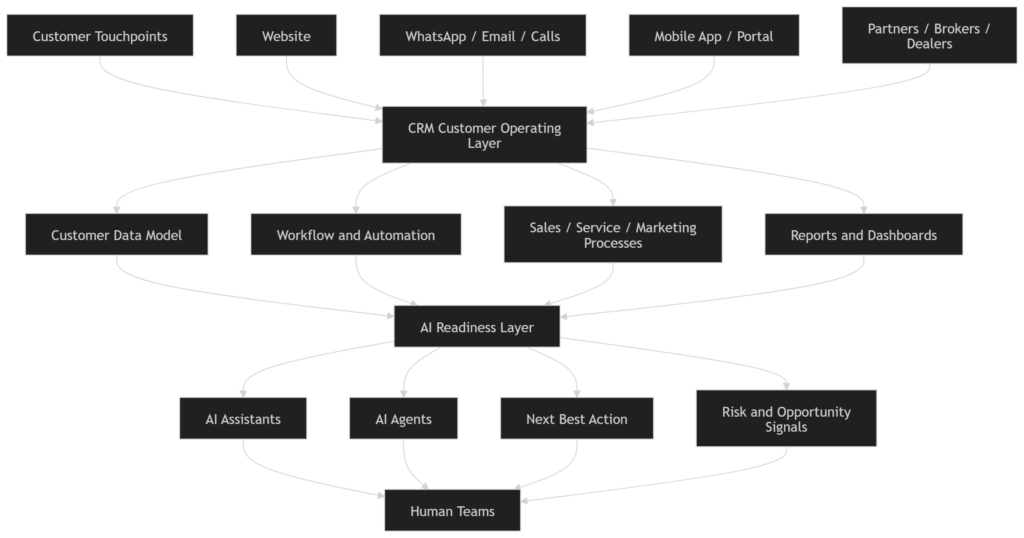
AI-ready CRM requires:
- Clean data
- Clear ownership
- Defined customer journeys
- Strong governance
- Secure access controls
- Integrated systems
- Measurable outcomes
- Human escalation paths
This is why CRM in 2026 is not only a technology conversation.
It is an operating model conversation.
AI-Ready CRM Architecture
Why Many CRM Systems Still Fail
Most CRM systems do not fail because the platform is weak.
They fail because the business has not clearly defined how customer work should flow.
Common failure patterns include:
| Failure Pattern | What Happens |
|---|---|
| CRM starts as a software project | Business process remains unclear |
| Too many fields | Users stop updating records properly |
| Weak adoption | Teams work outside the CRM |
| Poor data quality | Reports become unreliable |
| No integration | CRM becomes another silo |
| No governance | Stages, fields, and workflows become messy |
| Too much customization | System becomes hard to maintain |
| AI added too early | Bad data creates bad recommendations |
The lesson is simple.
CRM should not begin with screens.
It should begin with the business model.
Before configuring CRM, leaders should ask:
- What customer journeys matter most?
- What teams touch the customer?
- What information is required at each stage?
- What decisions should CRM support?
- What should be automated?
- What should require approval?
- What systems must integrate?
- What should AI assist with?
CRM Maturity Model for Business Leaders
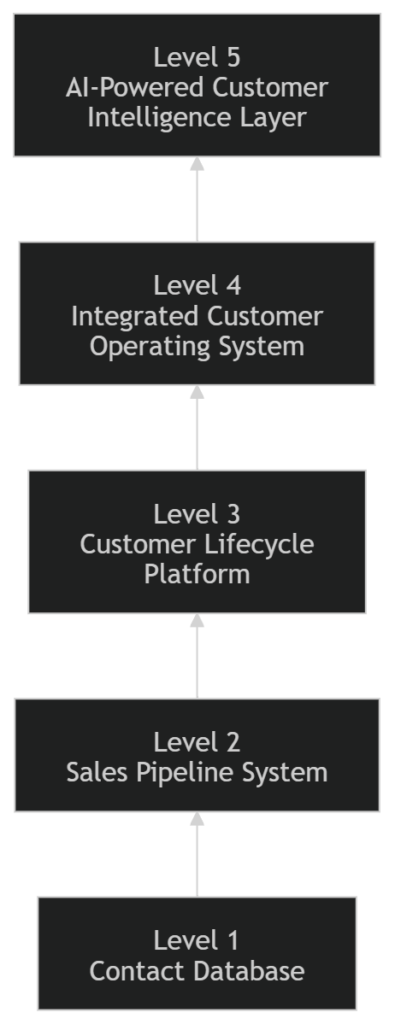
Level 1: Contact Database
CRM stores customer names, contact details, and basic notes.
Useful, but limited.
Level 2: Sales Pipeline System
CRM tracks leads, opportunities, stages, activities, and forecasts.
This is where basic sales discipline begins.
Level 3: Customer Lifecycle Platform
CRM connects sales, marketing, service, and customer success.
The company begins seeing the customer journey more clearly.
Level 4: Integrated Customer Operating System
CRM connects with ERP, finance, billing, inventory, portals, communication channels, and operations.
This is essential for complex companies such as real estate developers, banks, utilities, manufacturers, insurers, logistics companies, and telecom operators.
Level 5: AI-Powered Customer Intelligence Layer
CRM becomes intelligent.
It recommends actions, detects risks, summarizes interactions, supports AI agents, and helps teams make better decisions.
The challenge is that many companies want Level 5 AI outcomes while still operating with Level 2 CRM discipline.
That gap must be closed first.
What Will CRM Become by 2036?
By 2036, CRM may look very different.
It may no longer be centered around screens, tabs, forms, and dashboards.
It may become an intelligent customer operating environment where humans, AI agents, workflows, data, and systems work together continuously.
1. CRM Will Become More Conversational
Users may not always click through screens.
They may ask:
“Which customers are at renewal risk this quarter?”
“Which service requests are likely to breach SLA?”
“Which real estate units should we recommend to this buyer?”
“Which utility customers have repeated outage complaints?”
“Which accounts need executive attention this week?”
The CRM interface may become conversational, but the architecture behind it will need to be more structured than ever.
2. CRM Will Include AI Agents as Digital Team Members
AI agents may handle specific workflows such as:
- Lead qualification
- Meeting summaries
- Customer onboarding
- Renewal reminders
- Service triage
- Complaint classification
- Proposal preparation
- Collections reminders
- Field service coordination
- Customer portal assistance
Salesforce’s Agentforce Contact Center announcement in 2026 is one example of how CRM, digital channels, customer data, and AI agents are being brought together for customer service workflows. (Salesforce)
3. CRM Will Become More Industry-Specific
Generic CRM will not disappear.
But complex companies will increasingly need industry-specific CRM models.
A utility CRM needs premise, meter, billing, outage, and field service logic.
A real estate CRM needs unit, broker, payment plan, handover, and snagging logic.
A manufacturing CRM needs quote, dealer, configuration, production, warranty, and service logic.
By 2036, the best CRM systems will not only know the customer.
They will understand the industry context of the customer relationship.
4. CRM Will Move From System of Record to System of Decision
Traditional CRM tells us what happened.
Future CRM will help decide what to do next.
It will support:
- Next best action
- Churn prediction
- Service prioritization
- Offer recommendation
- Customer health scoring
- Risk alerts
- Revenue forecasting
- Field service optimization
- Customer lifetime value decisions
The future CRM will not simply report the business.
It will help run the business.
What Business Leaders Should Do Now
1. Define Your CRM Quadrant
Before choosing features, identify your business model.
Are you:
- Low product variation, low customization?
- High product variation, low customization?
- Low product variation, high customization?
- High product variation, high customization?
This helps define the CRM architecture.
2. Map Your Customer Lifecycle
Document the full journey:
- First inquiry
- Qualification
- Sales process
- Contracting
- Delivery
- Billing
- Service
- Renewal
- Growth
- Support
This shows where the CRM must create value.
3. Clean Your Data Before Scaling AI
Do not rush into AI before fixing:
- Duplicate records
- Missing fields
- Unclear ownership
- Poor activity history
- Weak stage definitions
- Inconsistent service categories
- Broken integrations
AI needs trustworthy data.
4. Integrate the Right Systems
CRM should connect with the systems that matter.
For many companies, this may include:
- ERP
- Billing
- Finance
- Inventory
- Website
- Customer portal
- Call center
- Field service
- Document generation
- BI dashboards
5. Build Governance
CRM needs ownership.
Define who owns:
- Data quality
- Field changes
- Sales stages
- Service categories
- Dashboards
- Automation rules
- AI use cases
- Integrations
- Security
- Continuous improvement
6. Start AI With Safe Use Cases
Start with practical AI use cases such as:
- Meeting summaries
- Follow-up drafting
- Lead scoring
- Case classification
- Knowledge suggestions
- Renewal alerts
- Complaint summarization
- Next best action recommendations
Then move toward more advanced agentic workflows.
Conclusion: CRM Is Becoming the Customer Operating System
CRM is no longer just a place to store customers, contacts, opportunities, and cases.
In 2026, CRM is becoming the operating layer for customer data, sales, service, marketing, automation, communication, and AI.
But the most important point is this:
Different companies need different CRM architectures.
A simple SaaS company needs a different CRM from a utility company.
A consulting firm needs a different CRM from a bank.
A real estate developer needs a different CRM from an e-commerce brand.
The right CRM strategy depends on product variation, customization level, customer journey complexity, integration needs, and business model maturity.
By 2036, CRM will likely become more conversational, more intelligent, more agent-driven, and more industry-specific.
The companies that win will not be the ones with the most CRM fields, dashboards, or licenses.
They will be the ones that design CRM as a true customer operating system.
Is Your CRM Ready for the AI Era?
Many companies have CRM software.
Far fewer have a CRM operating model.
IN3.ai helps enterprises assess, redesign, and modernize CRM across sales, service, marketing, customer experience, automation, integration, data, and AI readiness.
Book a CRM strategy discussion to understand what type of CRM architecture your business really needs.
FAQ
1. What is CRM?
CRM stands for Customer Relationship Management. It is a system that helps companies manage customer data, customer interactions, sales processes, service requests, marketing activities, and customer relationships across the full lifecycle.
2. What is CRM in 2026?
In 2026, CRM is becoming a customer operating layer that connects sales, service, marketing, data, automation, portals, communication channels, and AI assistance.
3. Why do different companies need different CRM systems?
Different companies have different product complexity, customer journeys, customization needs, approval workflows, service models, and integration requirements. A utility company, bank, real estate developer, SaaS company, and consulting firm should not use the same CRM design.
4. What type of CRM does a utility company need?
A utility company needs a complex operational CRM that manages customers, premises, meters, billing, payments, outages, complaints, field service, SLA tracking, and regulatory communication.
5. How is AI changing CRM?
AI is helping CRM systems summarize interactions, recommend next actions, score leads, classify cases, predict churn, automate routine work, and support AI agents. But AI requires clean data and clear processes.
6. What will CRM become by 2036?
By 2036, CRM may become an intelligent customer operating system where humans, AI agents, workflows, data, and industry-specific processes work together to support decisions and customer outcomes.
7. What should leaders do before adding AI to CRM?
Leaders should first clean CRM data, define customer journeys, simplify workflows, integrate key systems, create governance, and identify safe AI use cases.
Additional Industry Examples
Below are more examples that show why CRM design must change by industry, business model, customer journey, and operating complexity.
1. District Cooling Companies: CRM for Buildings, Units, Meters, and Service
District cooling companies are especially relevant in markets such as the UAE, Saudi Arabia, and large master-planned communities.
They usually serve a mix of:
- Developers
- Building owners
- Tenants
- Property managers
- Facility managers
- Commercial buildings
- Residential communities
- Mixed-use developments
At first, district cooling may look like a utility service. But the CRM complexity is high because the customer relationship is often connected to a building, unit, meter, tenant, owner, and facility manager at the same time.
District Cooling CRM Needs
| CRM Area | Requirement |
|---|---|
| Building master | Communities, towers, buildings, floors, units |
| Customer account | Owner, tenant, corporate account, property manager |
| Meter linkage | Unit-level or building-level cooling meter |
| Move-in / move-out | Tenant onboarding, disconnection, reconnection |
| Billing | Consumption, service charges, outstanding payments |
| Service requests | Cooling complaints, leakage, low performance, maintenance |
| Field service | Technician visit, inspection, repair, closure |
| Developer relationship | Project onboarding, bulk connections, handover |
| Customer portal | Bills, payments, requests, usage, documents |
Example
A district cooling company may need CRM to manage a tenant’s cooling connection, the owner’s account history, the building’s facility manager, unit-level consumption, billing disputes, and maintenance requests in one connected customer view.
For this company, CRM is not just customer service.
It is a building, meter, billing, and service operating layer.
2. Waste Management Companies: CRM for Contracts, Routes, Pickups, and SLAs
Waste management companies have a very operational CRM requirement.
Their customers may include:
- Municipalities
- Commercial buildings
- Malls
- Hotels
- Residential communities
- Industrial customers
- Construction sites
- Event organizers
The CRM must manage both commercial relationships and service execution.
Waste Management CRM Needs
| CRM Area | Requirement |
|---|---|
| Customer account | Municipality, building, community, commercial customer |
| Contract management | Service frequency, pricing, terms, renewal |
| Location mapping | Pickup points, service zones, routes |
| Schedule management | Daily, weekly, monthly pickup schedules |
| Complaint handling | Missed pickup, overflow, hygiene issue, damaged bin |
| Route integration | Vehicle, driver, GPS, proof of service |
| SLA tracking | Response time, missed-service resolution |
| Billing | Contract billing, variable charges, penalties |
| Reporting | Municipality reports, service performance, waste volume |
Example
A waste management company needs CRM to know which customer has which pickup schedule, whether a pickup was missed, which truck served the route, whether a complaint was raised, and whether the SLA was met.
For this company, CRM must connect customer management with route operations and service accountability.
3. Healthcare Networks: CRM for Patient Engagement and Care Journeys
Healthcare CRM is not only about patient records.
Clinical systems manage medical records, but CRM manages the patient relationship, communication, engagement, and service journey.
Healthcare networks may include:
- Hospitals
- Clinics
- Diagnostic centers
- Specialty centers
- Wellness centers
- Dental chains
- Home healthcare providers
Healthcare CRM Needs
| CRM Area | Requirement |
|---|---|
| Patient inquiry | Call center, website, WhatsApp, walk-in inquiries |
| Appointment booking | Doctor, department, branch, specialty, availability |
| Referral management | Doctor referrals, insurance referrals, partner referrals |
| Follow-up reminders | Test results, consultation follow-ups, health checks |
| Insurance coordination | Approval status, document collection, communication |
| Patient campaigns | Preventive care, wellness packages, health checkups |
| Complaint handling | Waiting time, billing issue, service feedback |
| Feedback | Satisfaction, NPS, post-visit survey |
| Multi-branch visibility | Patient journey across locations |
Example
A hospital CRM should help the team track a patient from inquiry to appointment, consultation, test follow-up, insurance coordination, feedback, and future preventive health campaigns.
For healthcare, CRM becomes a patient engagement and service experience layer.
4. Education Institutions: CRM for Admissions, Students, Parents, and Alumni
Education CRM is a lifecycle CRM.
The customer relationship may start before admission and continue for years after graduation.
Education institutions may include:
- Schools
- Universities
- Training institutes
- Online education platforms
- Executive education providers
- Coaching centers
Education CRM Needs
| CRM Area | Requirement |
|---|---|
| Inquiry management | Parent/student inquiries, campaigns, events |
| Application tracking | Forms, documents, status, eligibility |
| Admission workflow | Interviews, assessments, approvals |
| Parent/student communication | Updates, reminders, announcements |
| Fee communication | Payment reminders, scholarship communication |
| Student support | Complaints, requests, academic support |
| Event management | Open days, webinars, campus visits |
| Alumni engagement | Alumni database, donations, events, referrals |
| Campaign segmentation | Program interest, geography, intake year |
Example
A university CRM should manage a student from first inquiry to application, admission, onboarding, student support, graduation, and alumni engagement.
For education, CRM is not just lead management.
It is a student lifecycle relationship system.
5. Hospitality Groups: CRM for Guest Experience, Loyalty, and Personalization
Hospitality CRM is highly experience-driven.
Hotels, resorts, serviced apartments, restaurants, and hospitality groups need CRM to manage guest preferences, bookings, complaints, loyalty, and repeat visits.
Hospitality CRM Needs
| CRM Area | Requirement |
|---|---|
| Guest profile | Preferences, stay history, special requests |
| Booking history | Rooms, packages, restaurants, events |
| Loyalty program | Points, tiers, benefits, upgrades |
| Guest communication | Pre-arrival, during stay, post-stay |
| Complaint management | Room issue, service issue, billing issue |
| Campaigns | Seasonal offers, staycation, F&B, spa |
| Event inquiries | Banquets, conferences, weddings |
| Feedback | Reviews, surveys, satisfaction trends |
| Upsell | Room upgrades, dining, spa, experiences |
Example
A hotel CRM should know whether a guest prefers a certain room type, has stayed before, complained about service, booked a spa package, or is eligible for a loyalty upgrade.
For hospitality, CRM becomes a guest experience and personalization engine.
6. Retail Banking and Wealth Management: CRM for Relationship Depth
Retail banking and wealth management require CRM to manage both product ownership and relationship depth.
This is especially important for affluent, HNI, SME, and corporate customer segments.
Wealth / Relationship Banking CRM Needs
| CRM Area | Requirement |
|---|---|
| Relationship manager portfolio | Customers, tasks, meetings, opportunities |
| Customer 360 | Accounts, investments, loans, cards, complaints |
| Life event tracking | Property purchase, education, retirement, business expansion |
| Risk profile | Suitability, KYC, compliance, investment appetite |
| Product recommendations | Deposits, loans, insurance, investments |
| Service requests | Letters, statements, complaints, approvals |
| Meeting notes | Advisory discussions, follow-ups, commitments |
| Portfolio growth | AUM, product penetration, referral potential |
Example
A wealth CRM should help a relationship manager understand not only what products a customer holds, but also their life stage, financial goals, risk appetite, service history, and next best conversation.
For wealth management, CRM is a relationship intelligence system.
7. Public Sector and Municipal Services: CRM for Citizen Services
Public sector CRM is different from commercial CRM.
The “customer” may be a citizen, resident, business, visitor, applicant, or community member.
The goal is not always sales.
The goal is service delivery, transparency, responsiveness, and public trust.
Public Sector CRM Needs
| CRM Area | Requirement |
|---|---|
| Citizen profile | Resident, business, visitor, applicant |
| Service requests | Permits, complaints, certificates, inquiries |
| Case routing | Department, category, urgency, location |
| SLA tracking | Response and resolution timelines |
| Field inspection | Site visit, inspection report, closure |
| Communication | SMS, email, app notification, call center |
| Document management | Applications, approvals, certificates |
| Feedback | Satisfaction, complaint trends, service quality |
| Reporting | Department performance, public service metrics |
Example
A municipality CRM may need to manage a complaint about street lighting, route it to the right department, dispatch a field team, update the resident, track SLA, and report service performance to leadership.
For public sector organizations, CRM becomes a citizen service operating system.
8. Energy and Renewable Energy Companies: CRM for Projects, Assets, and Long-Term Service
Energy and renewable energy companies often have both B2B and B2C customer journeys.
They may manage solar installations, EV charging, energy audits, maintenance contracts, equipment warranties, and usage data.
Energy CRM Needs
| CRM Area | Requirement |
|---|---|
| Lead qualification | Residential, commercial, industrial energy interest |
| Site assessment | Property details, load requirement, feasibility |
| Proposal management | System sizing, pricing, ROI, approvals |
| Project tracking | Installation milestones, permits, inspections |
| Asset management | Solar panels, inverters, chargers, batteries |
| Service contracts | Maintenance, warranty, support requests |
| Usage monitoring | Consumption, generation, savings |
| Customer education | Reports, dashboards, sustainability impact |
Example
A solar company CRM should manage the customer from inquiry to site survey, proposal, approval, installation, commissioning, warranty, maintenance, and energy performance reporting.
For energy companies, CRM connects sales, project delivery, asset lifecycle, and long-term service.
Updated Industry Summary Table
You can replace the earlier summary table with this expanded version.
| Industry | Likely Quadrant | CRM Type | Key CRM Focus |
|---|---|---|---|
| Simple SaaS | Low variation, low customization | Simple Transaction CRM | Leads, demos, trials, renewals |
| Membership Business | Low variation, low customization | Simple Transaction CRM | Signups, reminders, renewals |
| Retail / E-commerce | High variation, low customization | Configurable Product CRM | Product matching, campaigns, purchase behavior |
| Automotive Dealerships | High variation, medium customization | Configurable Product CRM | Vehicle inventory, test drives, finance, service |
| Hospitality | High variation, medium customization | Experience CRM | Guest preferences, bookings, loyalty, feedback |
| Consulting | Low variation, high customization | Relationship-Led CRM | Stakeholders, proposals, account growth |
| System Integrators | Low variation, high customization | Relationship-Led CRM | Discovery, solution design, sales-to-delivery handover |
| Legal / Advisory Firms | Low variation, high customization | Relationship-Led CRM | Client matters, relationships, retainers, referrals |
| Real Estate Developers | High variation, high customization | Complex Solution CRM | Inventory, brokers, booking, payment plans, handover |
| Utility Companies | High variation, high customization | Complex Operational CRM | Premises, meters, billing, outages, field service |
| District Cooling | High variation, high customization | Complex Operational CRM | Buildings, units, meters, billing, service requests |
| Telecom Operators | High variation, high customization | Complex Solution CRM | Plans, devices, billing, churn, service |
| Banks | High variation, high customization | Complex Solution CRM | Customer 360, KYC, products, complaints |
| Wealth Management | Medium variation, high customization | Relationship Intelligence CRM | Portfolios, goals, risk profile, advisory notes |
| Insurance Companies | High variation, high customization | Complex Solution CRM | Policies, claims, brokers, renewals |
| Manufacturing | High variation, high customization | Complex Solution CRM | Quotes, dealers, product configuration, warranty |
| Logistics | High variation, high customization | Complex Operational CRM | Shippers, routes, rates, delivery exceptions |
| Waste Management | Medium-high variation, high customization | Complex Operational CRM | Contracts, pickups, routes, SLAs |
| Healthcare Networks | High variation, high customization | Lifecycle CRM | Appointments, referrals, follow-ups, feedback |
| Education Institutions | Medium variation, high customization | Lifecycle CRM | Admissions, students, parents, alumni |
| Public Sector / Municipality | Medium variation, high customization | Citizen Service CRM | Requests, permits, complaints, inspections, SLAs |
| Energy / Renewables | High variation, high customization | Asset + Project CRM | Site surveys, projects, assets, service contracts |
The more industries we study, the clearer this becomes: CRM is not a single category of software anymore.
It is a design problem.
A CRM must be designed around the company’s customer journey, product structure, operating model, compliance needs, service commitments, and growth strategy.
For a utility company, the customer is linked to a premise, meter, consumption pattern, billing cycle, and service area.
For a real estate developer, the customer is linked to a unit, broker, payment plan, contract, handover journey, and post-sale service.
For a hospital, the customer journey may begin with an inquiry, but it continues into appointment booking, insurance coordination, follow-up care, feedback, and preventive health engagement.
For a municipality, the customer may be a resident raising a service request that needs routing, field inspection, SLA tracking, and public accountability.
This is why the future of CRM will be more industry-specific.
The platform may be common.
But the operating model cannot be generic.
Is Your CRM Ready for the AI Era?
Many companies have CRM software.
Far fewer have a CRM operating model.
IN3.ai helps enterprises assess, redesign, and modernize CRM across sales, service, marketing, customer experience, automation, integration, data, and AI readiness.
Book a CRM strategy discussion to understand what type of CRM architecture your business really needs.
